Enhancing Production Accuracy with a Custom Fabrication Detail Solution in Business Central
Apr 17, 2026
5 mins read
Dynamics 365 Business Central
The client produces:
Each order requires detailed fabrication specifications, including exact dimensions and quantities for multiple pieces within a single sales line.
While Microsoft Dynamics 365 Business Central provides strong core ERP functionality, it does not natively support capturing this level of granular fabrication detail during Sales Order entry.
As a result, the client was forced to:
This process created inefficiencies, limited visibility, and increased the potential for costly production errors.
To solve this, we developed a Fabrication Detail Worksheet directly within Business Central—enabling the client to capture all required production specifications at the time of order entry.
This custom interface allows users to input:
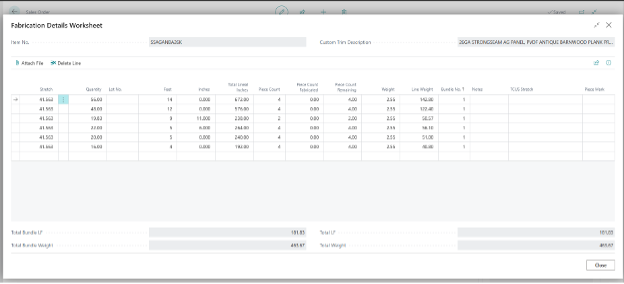
One of the key enhancements is the ability to automatically calculate the total lineal footage for each Sales Line.
By combining:
…the system calculates the total quantity in lineal feet, ensuring accuracy in both pricing and production requirements—without manual math or external tools.
Once all fabrication details are entered, users can generate Production Orders directly from the Sales Order.
This creates a seamless flow from sales to production, ensuring that:
To further streamline operations, the Fabrication Detail Worksheet was embedded across all relevant areas of the system, including:
This ensures that every team—from production to shipping—has access to the same detailed, consistent information.
By moving fabrication details directly into Business Central, the client achieved:
For manufacturers dealing with custom dimensions and complex production requirements, standard ERP functionality often needs to be extended to meet real-world demands.
This solution highlights how a tailored approach within Business Central can transform fragmented, manual workflows into a fully integrated, efficient, and scalable process—all while keeping critical data in a single system of record.
If your team is still relying on spreadsheets to manage production specifications, it may be time to bring that functionality directly into your ERP.
Our client, a rapidly expanding business, faced a critical operational challenge after adding a second facility—a large warehouse. Effective communication between the front desk team in Building 1 and the warehouse/loading team in Building 2 was essential for efficiency and safety. They required a web application to streamline this process, enabling the front desk to log customer arrivals and assign loading lanes while the warehouse team managed bay assignments and loading status. The app needed to support 10-15 simultaneous users with realtime updates, integrate with their Business Central ERP system to update sales orders, and maintain a historical log of customer activity.
Files exchange in between systems is not the best way to integrate. However, when API is unavailable or cannot be used, SFTP (SSH/Secure File Transfer Protocol) can be one of the options to consider
For Business Central on-premises you can use WinSCP dotnet libraries and successfully read/write/delete files directly on SFTP server. However, you can't use this approach for SaaS Business Central. What can be done in that case? The answers are provided in the article below.
Learn about the advantages of switching from QuickBooks to D365 Business Central when it comes to scalability.